

If you’re staring at your screen wondering whether to drop big money on Ahrefs or save cash with KWFinder, you’re not alone. KWFinder vs Ahrefs comes up every time someone wants to rank content without wasting hours on the wrong keywords. Both tools help you find keywords, check difficulty, and spy on competitors. But they do it very differently.
I’ve used both for client sites, my own blogs, and tiny niche projects. So let’s walk through what you actually get, what you don’t, and which one wins for your situation.
KWFinder vs Ahrefs: What Are You Actually Comparing?
You want rankings, traffic, and revenue. Both tools promise to get you there. But they take different roads.
KWFinder lives inside Mangools. It focuses on one thing: help you find keywords you can rank for without a huge site or budget.
Ahrefs is a full SEO suite. You get keywords, backlinks, content tools, site audits, rank tracking, and more. You pay for the ecosystem.
So KWFinder vs Ahrefs for keyword research isn’t apples to apples. It’s “focused app” vs “all‑in‑one platform.”
Ahrefs vs KWFinder Detailed Comparison of Features, Pricing, and Data Accuracy
Let’s put KWFinder vs Ahrefs side by side. You can see where each tool shines and where it falls short.
|
Feature |
KWFinder |
Ahrefs |
|---|---|---|
|
Core Strength |
KWFinder long‑tail keyword research and difficulty score |
Ahrefs Traffic Potential and keyword difficulty metrics |
|
Keyword Database Size |
8.9B keywords. Strong for Google. |
28.7B keywords. Covers Google, YouTube, Amazon, Bing, more |
|
Keyword Suggestions |
Ahrefs keyword explorer vs KWFinder keyword suggestions: KWFinder gives autocomplete, questions, related terms |
Ahrefs gives 10+ reports: also clicked, newly discovered, parent topic, traffic share |
|
Difficulty Score |
KD 0‑100. Easy to read. Great for beginners |
KD 0‑100. Based on backlinks needed. More technical |
|
SERP Analysis |
KWFinder local SEO and SERP analysis features built in. See real Google results for any location |
SERP overview with SERP features, positions history, intent |
|
Backlink Data |
Ahrefs backlink analysis vs KWFinder backlink data: KWFinder uses LinkMiner. Good for quick checks |
Ahrefs runs the 2nd largest crawler after Google. Industry standard |
|
Site Audit |
Not included. Mangools suite has SiteProfiler but separate |
Ahrefs site audit, content explorer, and rank tracking vs KWFinder’s focused keyword tool. Full technical audits |
|
AI Search Metrics |
KWFinder SGE Difficulty Score and Generative Visibility Index for AI results |
Ahrefs tracks AI Overviews in SERP features. No dedicated SGE score yet |
|
Ease of Use |
Which is easier to use KWFinder or Ahrefs for beginners learning SEO? KWFinder. Clean UI. No overwhelm |
Steeper learning curve. Tons of data |
|
Best For |
KWFinder for bloggers, freelancers, and small businesses on a budget |
Ahrefs for agencies, enterprise SEO teams, and advanced users |
You see the pattern. KWFinder keeps things focused. Ahrefs goes broad and deep.
Core Purpose: What Problem Does Each Tool Solve?
KWFinder: Built for Speed and Simplicity
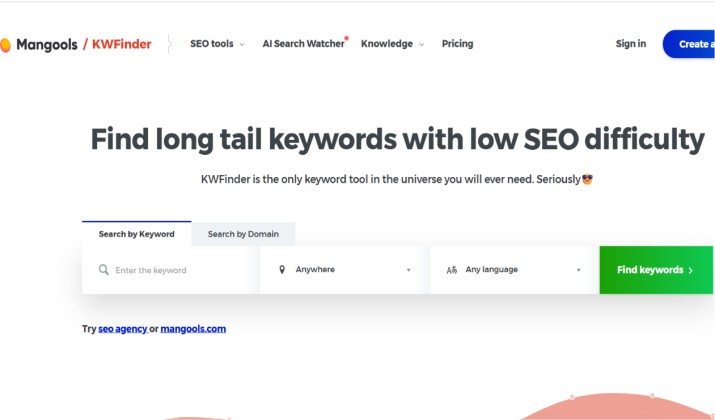
You open KWFinder for finding low‑competition long‑tail keywords. In addition, you want search volume, KD, and the real SERP. Plus, you want to know if you can win that term this month. That’s it.
Ahrefs: Built for Scale and Depth
You open Ahrefs when you plan content clusters, hunt for link targets, audit a 10,000 page site, or track 500 keywords for clients. Ahrefs Traffic Potential and keyword difficulty metrics help you map topical authority.
If you run a solo blog, you probably don’t need all that. If you run an agency, you can’t live without it.
KWFinder vs Ahrefs for Keyword Research: Database and Suggestions
Keyword Database Size
Ahrefs reports 28.7B keywords across Google, YouTube, Amazon, Bing, and others. KWFinder reports 8.9B keywords for Google.
Bigger isn’t always better. But if you create YouTube scripts or Amazon listings, Ahrefs gives you data KWFinder doesn’t.
Ahrefs Keyword Explorer vs KWFinder Keyword Suggestions
KWFinder shows you autocomplete, questions, and related keywords. You filter by KD, search volume, or include/exclude terms. You get what you need in 2 clicks.
Ahrefs gives you Matching terms, Related terms, Also rank for, Search suggestions, Newly discovered, and Questions. You also get Parent Topic and Traffic Share. You can build a whole content plan from one seed term.
For pure speed, KWFinder wins. For depth, Ahrefs wins.
Keyword Difficulty: Which Score Can You Trust?
KWFinder Long-Tail Keyword Research and Difficulty Score
KWFinder uses a 0‑100 KD score with color codes. Green means go. It looks at on‑page and off‑page factors but keeps the math simple. Beginners love it because you don’t second guess the number.
Ahrefs Keyword Difficulty
Ahrefs KD is also 0‑100, but it’s based mainly on the number of referring domains the top pages have. That’s more technical. A KD 10 term might still be hard if Google shows forums and Reddit.
If you want a fast read on winnability, use KWFinder. If you want to know exactly how many links you need, use Ahrefs.
KWFinder’s Local SEO and SERP Analysis Features
This is where KWFinder pulls ahead for small sites. You pick a country, city, or even zip code. Then, check the live SERP for that location. Now, you get local search volumes and SERP features.
KWFinder vs Ahrefs for local SEO and niche sites favors KWFinder. You run a plumber site in Memphis? You can see what shows up for “emergency plumber near me” in Memphis, not just country‑wide.
Ahrefs lets you set a location too. But KWFinder bakes it into the main workflow. You click once and you’re there.
Ahrefs Backlink Analysis vs KWFinder Backlink Data (via Mangools LinkMiner)

Be honest with yourself here. Do you build links every week?
Ahrefs runs a massive crawler. You get referring domains, dofollow/nofollow, anchor text, lost/new links, and broken backlink reports. There’s the option to set alerts. You can also run Batch Analysis on 200 prospects. This is Ahrefs for backlink analysis and competitive research. It’s the industry default.
KWFinder doesn’t do backlinks. Mangools gives you LinkMiner. It shows referring domains and link strength for a URL. Great for quick checks. Not for link campaigns.
So is Ahrefs worth it over KWFinder for backlink analysis and technical SEO? Yes. If links are part of your growth plan, you need Ahrefs.
Ahrefs Site Audit, Content Explorer, and Rank Tracking vs KWFinder’s Focused Keyword Tool
Site Audit
Ahrefs crawls your site like Google. You get Health Score, Core Web Vitals, broken pages, and fix lists. KWFinder has no crawler. Mangools has SiteProfiler for a domain overview, but it won’t replace an audit.
Content Explorer
Ahrefs lets you search 14B pages by topic, traffic, and backlinks. You find content ideas and link targets fast. KWFinder doesn’t have this.
Rank Tracking
Ahrefs Rank Tracker tracks desktop and mobile, tags, and SERP features. Mangools gives you SERPWatcher. It’s clean and simple. Perfect for tracking 50‑100 terms. If you track 1,000 terms across clients, Ahrefs scales better.
KWFinder vs Ahrefs for AI-Era SEO and Generative Search Visibility Metrics
Search changed in 2024 and it keeps shifting. You need to know if AI Overviews will kill your clicks.
KWFinder SGE Difficulty Score and AI Snapshot Visibility
KWFinder now flags if a keyword triggers an AI snapshot. You get KWFinder SGE Difficulty Score and Generative Visibility Index for AI results right in SERPChecker. That helps you skip terms where Google answers everything above the fold.
Ahrefs vs KWFinder for AI-Powered Search and Google SGE
Ahrefs tracks “AI Overview” as a SERP feature. You can filter keywords that show it. You don’t get a dedicated difficulty score yet, but you get the raw data to build your own system.
KWFinder vs Ahrefs for generative search and AI overviews: KWFinder gives you a faster yes/no. Ahrefs gives you more data to dig.
KWFinder or Ahrefs: Which Is Easier To Use for Beginners Learning SEO?
You log into KWFinder and you know what to do. Search a term. Check KD. Look at SERP. Done. The UI stays out of your way.
Ahrefs drops you into a dashboard with 8 tools. You have to learn what Site Explorer, Keywords Explorer, and Content Explorer do. It takes a week to feel comfortable.
So which is easier to use KWFinder or Ahrefs for beginners learning ecommerce SEO? KWFinder. No contest. You spend time publishing, not learning the tool.
Pricing Breakdown
KWFinder Pricing
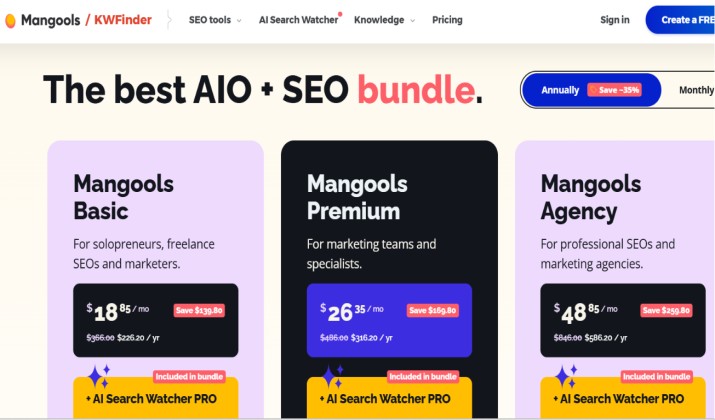
KWFinder is sold as part of the Mangools SEO bundle, with pricing starting around $30–$40/month for the Basic/Premium tiers and going up to about $70/month for the Agency plan, depending on whether you pay monthly or annually.
All paid plans unlock the full Mangools toolkit (KWFinder, SERPWatcher, SERPChecker, LinkMiner, SiteProfiler), and annual billing typically saves 35–40%, bringing the effective monthly price on the main plans down to roughly $18.85–$48.85.
There’s also a limited free tier with 5 keyword searches per day and a short money‑back period to test the tool.
Ahrefs Pricing
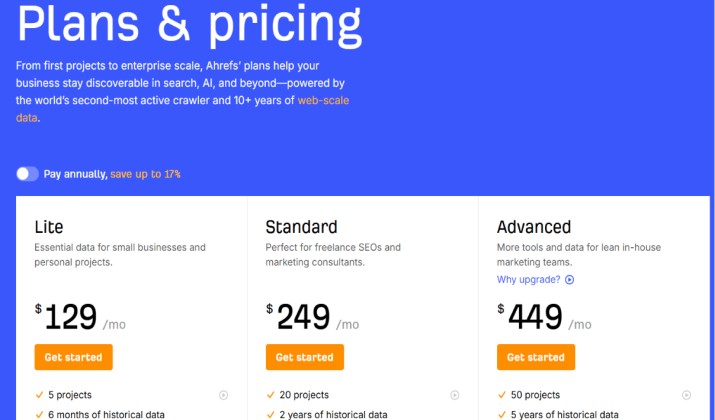
Ahrefs currently has four main subscriptions: Lite ($129/month), Standard ($249/month), Advanced ($449–$499/month), and Enterprise (~$1,499/month), with annual billing knocking roughly 16–20% off those rates.
All paid plans unlock Ahrefs’ full SEO toolkit (Site Explorer, Keywords Explorer, Site Audit, Rank Tracker, Content Explorer) with increasing limits at higher tiers.
Pricing is subject to change. Please refer to the official pricing pages for the latest prices.
Data Accuracy and Update Frequency
Both tools estimate. Neither has Google’s private data.
Ahrefs updates its US database every 1‑2 days and crawls 24/7. You get Clickstream data for Traffic Potential. That helps you avoid keywords with 10,000 searches but 200 clicks.
KWFinder refreshes monthly for most keywords and on demand for SERPs. For local terms, it often feels more accurate because you pull the real SERP for that city.
Run your own test. Take 10 terms from Google Search Console and compare volumes. For global terms, Ahrefs usually looks stronger. For KWFinder vs Ahrefs for local SEO and niche sites, KWFinder often feels closer.
Ahrefs vs KWFinder: Workflow Speed
You have 30 minutes to plan next week’s content.
With KWFinder, you type a topic, set KD under 35, filter for questions, and export 20 terms. You check the SERP for each. You pick 4. Done.
With Ahrefs, you do the same, but you also check Parent Topic, Content Gap, and Traffic Potential. You get better ideas, but you spend 15 more minutes.
If you publish two posts per week, KWFinder keeps you moving. If you plan three months of content for a client, Ahrefs gives you better foundations.
KWFinder vs Ahrefs for Tracking AI Search Visibility and SGE-Era Keywords
Let’s say you target “best protein powder for women”.
In KWFinder, SERPChecker shows an AI snapshot covers 80% of the screen. The SGE Difficulty says “High”. You skip it and target “unflavored whey protein for smoothies” instead. Green KD, no AI snapshot.
In Ahrefs, you filter SERP features for “AI Overview”. You see the same result, plus you check Traffic Potential. Maybe the term still gets 1,000 clicks monthly despite the AI box. You decide if it’s worth it.
KWFinder gives you a gut check. Ahrefs gives you the math.
Who Should Pick Which Tool?
KWFinder for Bloggers, Freelancers, and Small Businesses on a Budget
If you want to rank without getting lost in data and you care about local terms and low KD long‑tails, KWFinder is the right choice. With it, you can track under 100 keywords. You don’t have to build links daily. Plus, your budget is under $50 per month.
Ahrefs for Agencies, Enterprise SEO Teams, and Advanced Users
If you manage multiple sites or clients and need backlink data, site audits, and Content Gap reports, go for Ahrefs. This way, you can run outreach and get link prospects. It also enables you to forecast traffic with Traffic Potential. Your budget is $129+ per month and you bill for the work.
The Clear Winner of KWFinder vs Ahrefs
For 80% of readers, KWFinder wins.
You get the best balance of price, usability, and accuracy for content‑driven SEO. KWFinder gets you low‑competition, long‑tail keywords fast. You see AI risks before you write and track rankings without noise. Plus, you pay $29 to $49 instead of $129.
Ahrefs is the better tool overall. It does more. But “more” only matters if you use it. If you don’t audit sites, build links, or manage clients, you waste money.
Start with KWFinder. Grow your traffic. When you hit 50k sessions and links become your bottleneck, add Ahrefs. Use both for three months, then decide if you can drop one.
That’s the smart path. KWFinder vs Ahrefs ends with you using KWFinder first, then graduating to Ahrefs when your site can pay for it.




![10 Best Ahrefs Alternatives & Competitors [Free & Paid]](https://mofluid.nyc3.cdn.digitaloceanspaces.com/blog/wp-content/uploads/2020/05/10-Best-Ahrefs-Alternatives-Competitors.png)