
You spend hours writing content, but Google sends you 12 clicks. The problem is not your writing. It’s your keywords. Pick the wrong ones and you stay invisible. Pick the right ones and traffic shows up. That’s why you’re looking at KWFinder vs Semrush.
Both promise better keyword data. But they work differently, cost differently, and fit different stages. I’ll show you exactly which one matches your site so you stop wasting time and start ranking.
KWFinder vs Semrush at a Glance
Before we dig into details, here’s the quick breakdown:
|
Feature |
KWFinder |
Semrush |
|---|---|---|
|
Best for |
Quickly finding low-competition, easy-to-rank keywords |
Comprehensive research, competitor strategy, backlinks, audits |
|
Keyword database |
2.5 billion keywords, 100 million related terms |
23+ billion keywords, 20+ billion in Keyword Magic Tool |
|
Difficulty score |
Simple, reliable metrics |
Detailed KD % score with searcher intent |
|
Long-tail focus |
Built for long-tail suggestions with local search options |
Keyword Magic Tool excels at longtail, high-opportunity keywords |
|
Full SEO suite |
Part of Mangools: SERP analysis, rank tracking, backlink tool, site profiler |
50+ tools: site audit, backlink audit, content, PPC, social, AI visibility |
|
Ease of use |
Intuitive, beginner-friendly interface with minimal learning curve |
More complex but powerful once you learn it |
|
Local SEO |
65,000+ locations for local keyword data and SERP analysis |
Local SEO toolkit add-on with GBP optimization, map rank tracking |
|
AI search tracking |
Limited SGE metrics |
Dedicated AI Visibility Toolkit for ChatGPT, AI Overviews, 5 LLMs |
KWFinder vs Semrush: Detailed Comparison of Features
Which SEO Tool Finds Better Long-Tail Keywords?
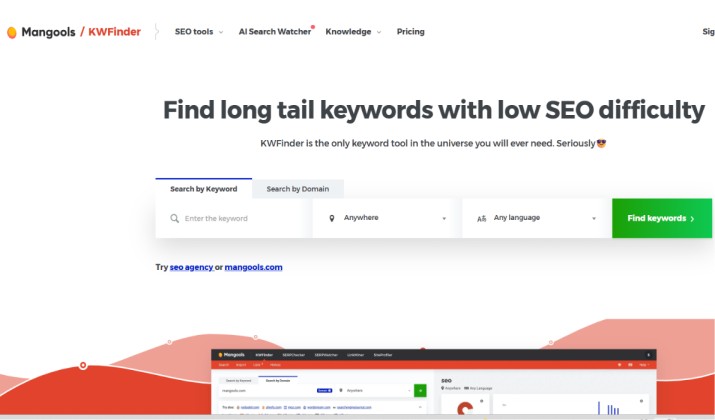
You win with long-tail keywords when you can spot low competition fast. KWFinder was built for that job.
Type a seed keyword, pick your country, even drill down to cities like Los Angeles or London. KWFinder shows you related phrases, questions, and local search volumes in seconds. Its difficulty score is straightforward. If you see KD under 30, you know you have a shot without a huge backlink budget.
Semrush takes a different path. You open the Keyword Magic Tool and get thousands of suggestions from a 23+ billion keyword database. You can filter by question, broad match, exact match, and search intent. Users love it for “honing in on longtail, high-opportunity keywords”. Plus, you see which SERP features show up, like AI Overviews, so you know if clicks will even happen.
KWFinder vs Semrush: Keyword Research Depth
KWFinder gives you search volume, CPC, PPC competition, and KD. You also get historical search trends to spot seasonal topics. It pulls 2.5 billion related keywords.
Semrush shows volume, KD%, trend, SERP features, intent, and competitive density. It ties into Google Analytics for more accurate data. In head-to-head volume tests, KWFinder, Semrush, and Ahrefs were close, while SpyFu was lower. Difficulty scores vary by tool because each uses its own formula.
KWFinder vs Semrush: SERP Analysis and Local Keyword Data
KWFinder includes SERPChecker. You see DA, PA, links, FB shares, and LPS for each top 10 result. More important for local businesses: you pick from 65,000 locations and get precise local SERPs. That means you can check “plumber” rankings in Kansas City vs Chicago without proxies.
Semrush shows similar metrics plus 44 SERP features. You need the Local toolkit add-on for map rank tracking and GBP optimization. So KWFinder vs Semrush for local SEO gives KWFinder the edge on built-in local data. Semrush catches up if you buy the add-on.
Competitor Research, Backlink Audit, and Site Audit vs KWFinder’s Focused Keyword Tool
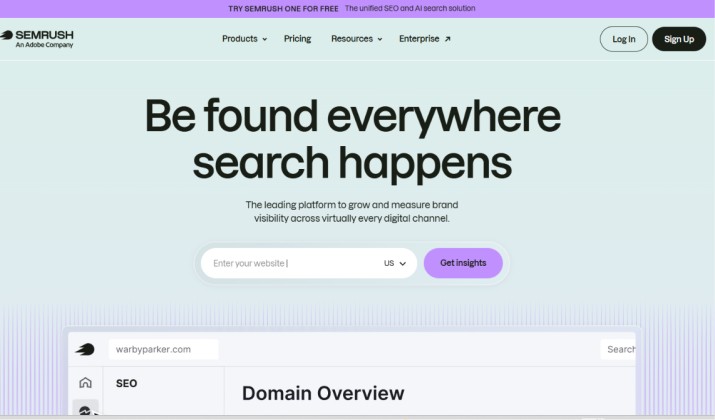
This is where the tools diverge. KWFinder does one thing: keywords. You can check competitor keywords by domain and see their top terms. For backlinks, you switch to LinkMiner. For rank tracking, SERPWatcher.
Semrush puts it all in one dashboard. You run a full site audit, backlink audit, gap analysis, and track positions. You also get PPC data, social posting, and content templates. If you need Semrush competitor research, backlink audit, and site audit, KWFinder can’t match that depth. KWFinder stays focused. Semrush tries to replace 5 tools.
Semrush AI Search / AI Overviews visibility metrics vs KWFinder SGE metrics
AI Overviews now steal clicks. Semrush launched an AI Visibility Toolkit that tracks your brand across ChatGPT, Gemini, Perplexity, and Google AI Overviews. You see prompts, citations, sentiment, and monthly audience. You can switch between LLMs and track visibility over time.
KWFinder doesn’t track AI Overviews yet. You get keyword data, but not AI prompt tracking or SGE impact. So Semrush vs KWFinder for AI content and AI search optimization goes to Semrush if AI visibility drives your traffic.
KWFinder vs Semrush Which Is Better for Bloggers and Niche Site Owners?
If you run one to three sites and your main job is publishing content, KWFinder makes your life easier.
Here’s why bloggers pick it:
- You learn it in 10 minutes. The UI is clean. No tabs within tabs.
- You pay less. Mangools Basic is $29.90/mo billed annually. That includes the whole Mangools suite.
- You get local data. If you write about “best tacos in Austin,” you need Austin SERPs. KWFinder gives you that.
- You focus on low-competition wins. The tool highlights weak spots in top 10 results.
Semrush Pro starts at $139.95/mo. For a solo blogger, that’s a jump. You get more data, but you might not use 80% of it.
So KWFinder for small businesses, niche sites, and bloggers on a budget makes sense. You get the best keyword research tool KWFinder or Semrush debate? For beginners, KWFinder is less overwhelming.
Semrush vs KWFinder for Agencies and Advanced SEOs
Agencies bill clients for results. You need reporting, user seats, and everything in one place.
Semrush delivers:
- Site audits and backlink audits that you can white-label.
- Position tracking for 500 to 1500+ keywords depending on plan.
- API access on Business plans for custom dashboards.
- AI prompt research to show clients how they appear in ChatGPT.
- Content marketing platform with SEO templates and writing assistant.
KWFinder has an Agency plan at $48.85/month billed annually with 1,200 keyword lookups per day. But you still need separate tools for audits and reporting.
For Semrush for agencies, in‑house SEO teams, and enterprise campaigns, the choice is clear. You pay more, but you replace Ahrefs, Screaming Frog, and Surfer. One login for the team. So Semrush wins when you need more than keywords.
KWFinder vs Semrush for AI Overviews, SGE, and ChatGPT-Driven Keyword Ideas
Search changed. Users get answers without clicking. You need to know if a keyword triggers an AI Overview and whether you’re cited.
Semrush tracks AI Overviews as a SERP feature on every keyword. The AI Visibility Toolkit then shows which prompts mention your brand and which sources LLMs cite. You can adjust content to get mentioned.
KWFinder doesn’t report SGE or AI Overview data yet. You can still find keywords, but you won’t know if Google answers them directly.
If your traffic depends on informational content, Semrush vs KWFinder for AI search, featured snippets, and topical clusters leans towards Semrush. You need that visibility data to adapt.
KWFinder vs Semrush: Which Has More Accurate Keyword Data and Volumes?
No tool is perfect. They all estimate.
A test of “customer success” showed: KWFinder 6.7K, Semrush 6.6K, Ahrefs 6.2K, SpyFu 4.8K. So KWFinder and Semrush are close.
Difficulty scores vary more. Semrush said 74, KWFinder 46. That’s because formulas differ. Semrush factors backlinks heavily. KWFinder weighs on-page factors too.
Semrush integrates with Google Analytics for extra accuracy. KWFinder uses multiple trusted sources but doesn’t plug into GA.
If you need directional data to pick topics, both work. If you report exact traffic to clients, Semrush’s extra integrations help.
Is KWFinder or Semrush Better for Beginners Learning Keyword Research?
Be honest about your stage.
KWFinder wins for beginners. You log in and immediately see search volume, KD, and SERP. No setup. The UI is “easy to figure out quickly”. You don’t need to watch a course.
Semrush has a learning curve. The interface is “a little less intuitive” and filtering “can be a little difficult at times”. It pays off once you learn it, but week one feels heavy.
So is KWFinder or Semrush better for beginners learning keyword research? Start with KWFinder. Graduate to Semrush when you need audits, backlinks, and client reporting.
KWFinder vs Semrush for Competitor Analysis and Backlink Research
KWFinder lets you enter a competitor domain and see their top keywords. You get position, volume, and KD. For backlinks, you jump to LinkMiner. It works, but it’s basic.
Semrush does competitor analysis across SEO, PPC, and content. You see traffic, top pages, keyword gaps, and ad copies. Backlink Analytics shows referring domains, toxicity score, and gap analysis.
If you just want to “steal” competitor keywords for a blog, KWFinder is enough. If you pitch enterprise clients and need backlink gap reports, Semrush is the standard.
KWFinder vs Semrush Pricing: Which Is Better for Small Businesses and Freelancers?
Let’s talk money.
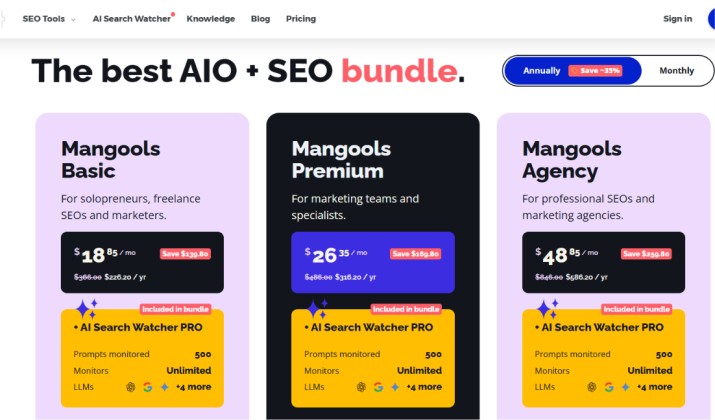
- Basic: $18.85/month billed annually. 100 lookups/day.
- Premium: $26.35/month billed annually. 500 lookups/day.
- Agency: $48.85/month billed annually. 1,200 lookups/day.
All plans include SERPWatcher, SERPChecker, LinkMiner, SiteProfiler.
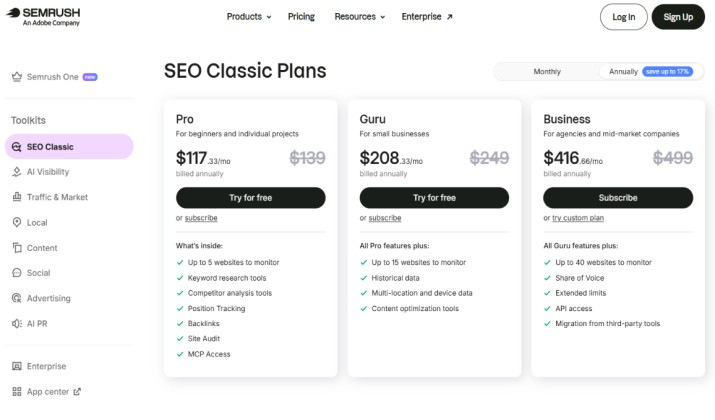
- Pro: $139.95/mo or $117.33/mo billed annually. 1 user, 5 projects.
- Guru: $249.95/mo or $208.33/mo billed annually. 3 users, Content Marketing Platform.
- Business: $499.95/mo or $416.66/mo billed annually. 5 users, API, white-label.
Pricing is subject to change. Please refer to the official pricing page for the latest.
So, which is the right choice for small businesses and freelancers? KWFinder costs 4x less at entry level. If your revenue is under $5K/month, that difference matters. You can always upgrade later. Semrush makes sense when SEO is a main service line and you need to bill for audits.