If you run ads, build funnels, or just need pages that convert, you’ve probably heard the Unbounce vs Webflow debate. Both are powerful. But they solve very different problems.
This post will show you exactly where Unbounce wins, where Webflow dominates, and how smart teams use both. Let’s get into it.
Who Is Unbounce Built For?
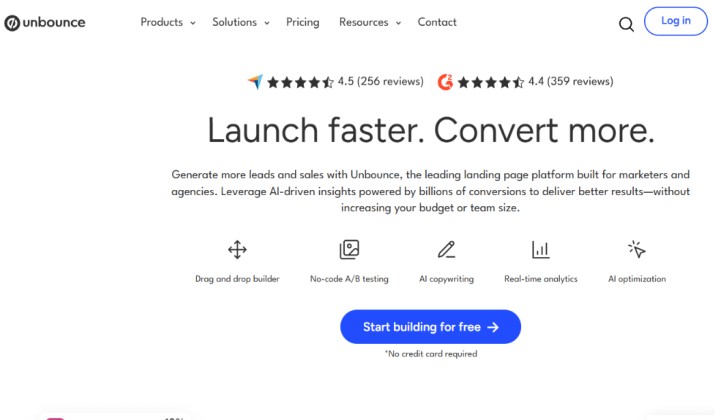
Think of Unbounce as your campaign war room. It’s an Unbounce AI‑powered landing page builder focused on conversion rate optimization. You don’t build your whole site here. You build pages that print leads.
You should look at Unbounce if you:
- Run paid ads on Google, Meta, LinkedIn, or TikTok
- Need to launch and test new offers in hours, not weeks
- Want AI to handle copy, layout, and traffic routing for you
- Care more about conversion rate than pixel-perfect animations
That’s Unbounce for paid ad campaign landing pages and lead generation funnels in a nutshell. Speed + data + conversions.
Who Is Webflow Built For?
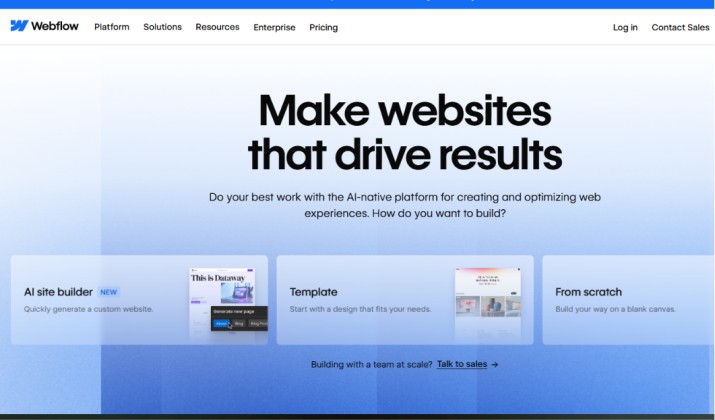
Webflow is your digital HQ. It’s a visual website builder with CMS, full design control, and responsive layouts. You can build a 5-page brochure site or a 10,000-page content machine.
You should look at Webflow if you:
- Need a full business site: home, about, blog, pricing, careers
- Want design freedom without writing CSS
- Manage SEO, content marketing, and brand experience in one place
- Work as a designer or agency and hate template limits
Webflow is perfect for full business websites, blogs, and multi‑page marketing sites. It replaces Webflow devs, WordPress, and a handful of plugins.
Also read: Unbounce vs Wix
Pricing, Features, Strengths and Areas for Improvement
Before we go deeper, let’s stack them side by side. This table gives you the snapshot.
|
Category |
Unbounce |
Webflow |
|---|---|---|
|
Core Purpose |
Campaign landing pages + CRO |
Full websites + CMS + hosting |
|
Ease of Use |
Very easy. Built for marketers |
Moderate. Built for designers |
|
A/B Testing |
Native on all plans + Smart Traffic AI |
Requires third-party tools |
|
CMS/Blogging |
No. Single pages only |
Yes. Powerful, flexible CMS |
|
Design Control |
Template-based with flexibility |
Full canvas. Control every div |
|
AI Features |
Smart Builder, Smart Copy, Smart Traffic |
AI site builder assistant, still evolving |
|
Page Limits |
20 to 500+ depending on plan |
Unlimited pages on CMS/Business plans |
|
Code Export |
Not available |
Available on paid Workspace plans |
|
Best Traffic Type |
Paid traffic you control |
Organic, direct, and paid |
|
Starting Price |
Around $99/mo |
Around $14/mo for basic site |
Unbounce
Pros
- You launch pages incredibly fast
- Smart Traffic lifts conversions without manual testing
- Popups and sticky bars are built in
- Integrations with ad and CRM tools are native and simple
Cons
- You can’t build a blog or full site
- Costs climb with traffic and conversions
- Design is flexible but not free-form like Webflow
Webflow
Pros
- You get true design freedom without code
- The CMS handles blogs, directories, and dynamic content easily
- Hosting is fast and secure out of the box
- You own the code and can export it
Cons
- Learning curve is steeper for beginners
- No native A/B testing or AI traffic routing
- Building one-off landing pages is slower than Unbounce
Unbounce or Webflow: Which Tool Gives Better Conversion Optimization Features?
Unbounce gives you three CRO tools out of the box.
- Classic A/B Testing: Split traffic 50/50 and see which headline wins.
- Smart Traffic: AI looks at visitor attributes and sends each person to the variant they’re most likely to convert on. You see results 30% faster.
- Smart Copy: AI writes page variants, CTAs, and ads for you to test.
Webflow gives you zero native CRO tools. You need to add Google Optimize replacements like VWO, Optimizely, or Convert. That means more scripts, more cost, and more setup.
So if CRO is your job, Unbounce has the edge.
Read this too: Unbounce vs Clickfunnels
Building Complete Websites vs Single-Purpose Landing Pages
Your goal decides the tool.
Use Unbounce when the page has one job: get the click, get the lead, get the sale. You’re sending paid traffic and you need to match message to ad, fast. This is why startups and SaaS companies focused on performance marketing usually leans towards Unbounce.
Use Webflow when the site has many jobs: rank on Google, tell your brand story, host resources, support customers. Webflow is your whole house. Unbounce is a high-performance guest room you build for specific visitors.
Which Is Easier for Non-Technical Marketers To Use?
Unbounce wins for speed. You pick a template, use Smart Builder to swap in your copy, connect your domain, and publish. No one needs to know what padding or z-index means. If you run campaigns, you’ll be live today.
Webflow takes time to learn. You think in boxes, classes, and responsive breakpoints. It’s visual, but it’s still web design. For a non-technical marketer, that’s a hurdle. But once you learn it, you can build anything.
Go Unbounce if you just need leads. Go Webflow if you want to level up your design skills.
Which Platform Is Better for Designers Who Want Full Visual Control?
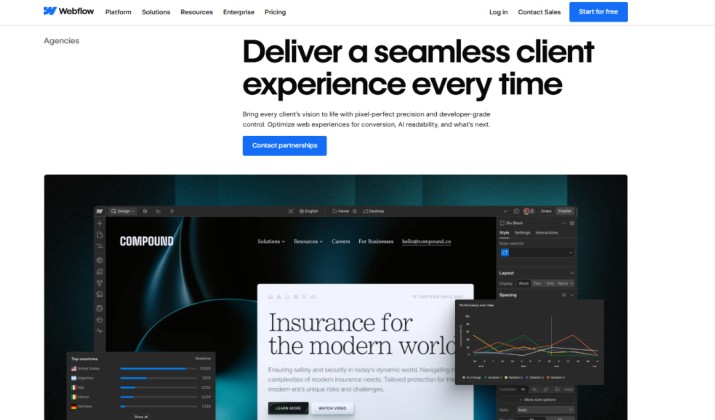
Webflow, no contest. You control layout, interactions, scroll animations, hover states, and CMS structure with no code. You can recreate any Dribbble shot. Agencies charge $10k+ for Webflow sites because the output looks custom-coded.
Unbounce lets you drag and drop. You can make beautiful pages. But you live inside a grid. You won’t build a WebGL experiment or a wild scroll experience. Design teams pick Webflow when brand matters as much as leads.
You might like this: Landingi vs Unbounce
Which Has Better Integrations With CRM, Analytics, and Automation Tools?
Both connect to everything. The difference is how.
Unbounce integrations with marketing stacks, CRMs, and Webflow via Zapier or webhooks are built for speed. HubSpot, Salesforce, Marketo, Mailchimp, ActiveCampaign, Slack, and dozens more are native. You point, click, map fields, and leads flow in seconds. It’s made for campaign operators.
Webflow connects through Zapier, Make, native webhooks, and the API. It’s powerful, but often needs a bit more setup. For complex logic or CMS-triggered workflows, Webflow is stronger. For best landing page builders for Google Ads and Meta Ads campaigns, Unbounce’s native integrations are faster to deploy.
A/B Testing, Smart Traffic, and Optimization Tools Comparison
Let’s double-click on testing.
With Unbounce, you create Variant A and Variant B inside the same page. Hit publish. Traffic splits. Smart Traffic can turn on once you hit 50 visitors. The AI starts routing. You get a dashboard showing conversion lift. Done.
With Webflow, you build your page. Then you go to VWO. You set up the test. You add VWO’s script to Webflow. You wait for data. You pay for two tools. It works, but it’s not native.
So, Unbounce trades some design freedom for optimization speed.
Can You Integrate Unbounce With Webflow To Run Campaigns While Keeping the Main Site on Webflow?
Yes, and you should consider it. This is using Webflow for the main site and Unbounce for campaign‑specific landing pages. Here’s the playbook smart teams use:
- Your main site lives on Webflow: www.yourdomain.com. Blog, product, about us, SEO content.
- Your campaigns live on Unbounce: get.yourdomain.com or try.yourdomain.com.
- You pass data between them: Use Zapier to send Unbounce form fills to your Webflow CMS, HubSpot, or Slack.
- You keep branding consistent: Match fonts, colors, and styles so users don’t feel the switch.
This setup gives you Webflow’s SEO and brand power plus Unbounce’s campaign speed. For agencies and freelancers managing multiple brands and campaigns, this hybrid model is the standard.
Unbounce vs Webflow for Agencies Managing Multiple Clients and Landing Pages
Agencies have two needs: build beautiful sites and launch fast campaigns.
With Unbounce for agencies, teams manage client sub-accounts directly. They clone top-performing pages across clients in minutes. Reporting breaks down conversions per client. During a Meta Ads sprint, launching 20 pages in a week is normal. That’s why agencies managing multiple clients and landing pages often favor Unbounce for media buying teams.
With Webflow for agencies, Workspaces, client billing, and role permissions keep projects organized. You craft premium websites that justify retainers. When a client requests a new section, you build it visually without code. However, if they need 10 ad variants by Friday, the process feels slow compared to Unbounce.
Many agencies bill for both: Webflow site retainers + Unbounce campaign management.
Pricing, Features, and Use Cases: Which Tool Offers Better Value for Small Businesses?
Let’s talk budget.
Unbounce Pricing
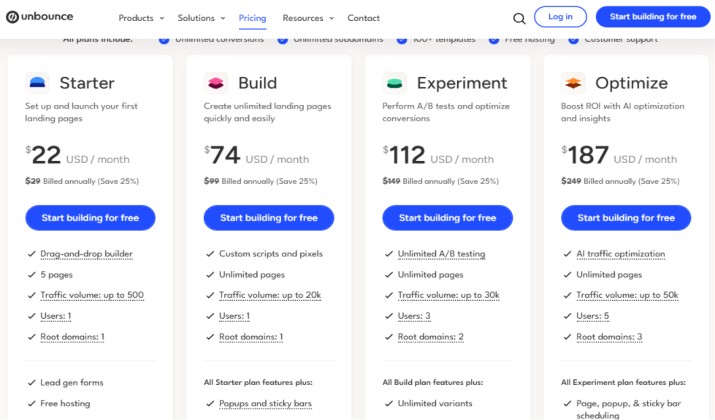
Unbounce starts at $29 per month for the Starter plan, but the annual billing option reduces the cost to $22 per month. The platform is designed for marketers who want to create high-converting landing pages without writing code.
Unbounce also offers four other plans. Prices are billed monthly, but paying yearly saves you 25%.
- Build: $99/month (or $74/month annually). Includes unlimited pages, pop-ups, and sticky bars for up to 20,000 monthly visitors.
- Experiment: $149/month (or $112/month annually). Adds A/B testing to see which page works best. This plan allows up to 30,000 visitors.
- Optimize: $249/month (or $187/month annually). Adds AI-powered Smart Traffic that directs visitors to the page they are most likely to buy from. This supports up to 50,000 visitors.
- Agency: $499/month. Built for marketing agencies needing 100,000+ visitors, sub-accounts for clients, and advanced team collaboration tools.
Webflow Pricing
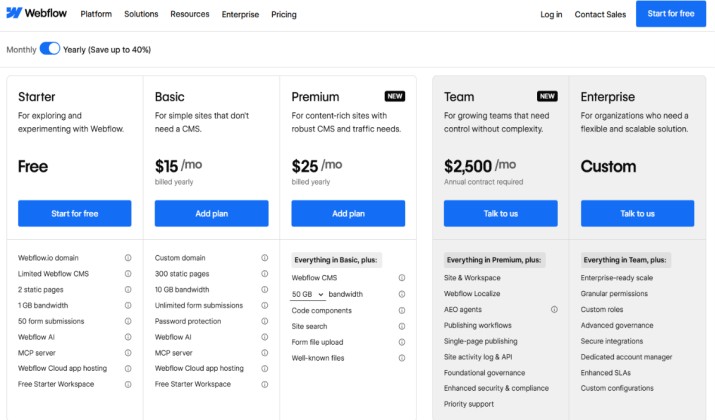
Webflow’s pricing uses two categories: Site Plans (to launch websites with a custom domain) and Workspace Plans (for team collaboration). Prices drop about 20% when paid yearly.
1. Site Plans
- Starter: $0/month. For testing. Includes a webflow.io domain and 2 pages.
- Basic: $15/month. For static sites. Includes 300 pages and 10 GB bandwidth.
- Premium: $25/month. For blogs and businesses. Includes 20,000 CMS items and 50 GB bandwidth.
2. Workspace Plans (For teams & agencies)
- Freelancer: $16/month.
- Core: $19/month.
- Team: $2,500/month. For large organizations needing premium staging and single-page publishing.
So which is better value? If you need a main website, Webflow is cheaper. If you spend $5k/month on ads, Unbounce’s conversion lift pays for itself in a week. For a small business doing both, budget for both. The ROI is there.
Real Use Cases: How Teams Actually Use These Tools
Case 1: SaaS Startup Spending on Google Ads
Picture a SaaS team weighing focused on performance marketing. They need trial signups. Ten ad groups run at once. They pick Unbounce. Why? They spin up a page per ad group with perfect message match.
Smart Traffic pushes trial rate from 8% to 11%. That’s 37% more trials for the same budget. Meanwhile, their main marketing site stays on Webflow.
Case 2: Design Agency Building Brand Sites
An agency signs a client who needs a new site with a blog, portfolio, and careers page. Webflow is the pick. They control interactions and the client edits the blog without tickets.
Later the client wants LinkedIn ads. The agency uses Unbounce for those, because fast A/B tests matter.
Case 3: Ecommerce Brand Running Promos
You’re on Shopify. Your main site is Shopify or Webflow. Black Friday is coming and you need five promo landing pages that don’t touch your main theme. Unbounce handles it. You launch, test, and pull them down Dec 1. Zero developer time needed.
So, Which One Should You Pick?
We promised not to leave it vague. Here’s the call.
If your #1 goal is leads and sales from paid traffic, Unbounce is better.
Unbounce optimizes for conversions. The AI tools, native testing, and marketer-first workflow mean you get more leads per dollar spent. If you miss revenue targets because of landing page performance, start with Unbounce.
For branding, SEO, content, and design control though, Webflow leads.
You need a site that looks amazing, ranks, and scales with content. It’s the closest you get to code without coding.
The best answer for many teams. Use both. Webflow is your foundation. Unbounce is your acquisition accelerator. You stop arguing about which landing page builder is better and you use each for what it does best.
That’s the real-world way to win this year.